AI and MCP
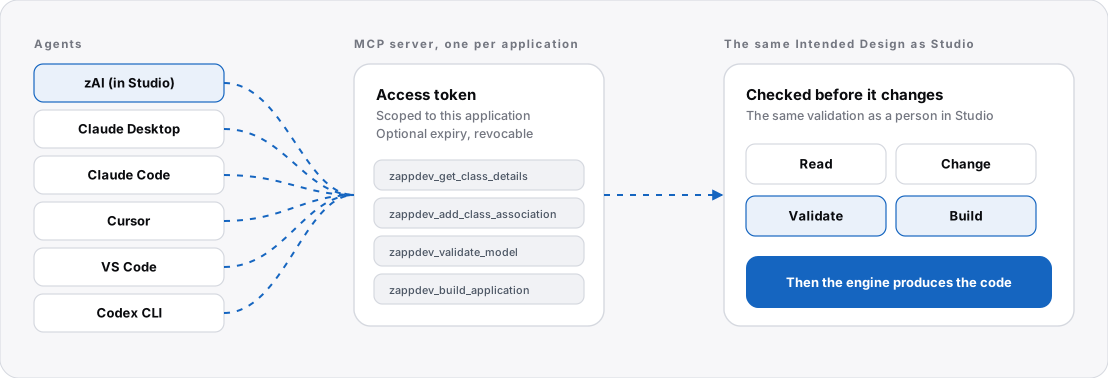
In zAppDev, AI helps you describe your business application, and the engine produces the code. AI agents and people work on the same thing: the Intended Design. An agent does not guess your architecture from files. It reads the Intended Design, proposes a change to it, and the change is validated before any code is produced.
Why the Intended Design matters to an AI
Memory files, skills and specifications help an agent find its way, but they are advice: they cover what someone wrote down, they can go stale, and nothing checks the result. The Intended Design is different in kind:
- It describes the whole application, across every kind of model, in one connected description.
- It is checked mechanically by the engine, not by convention.
- The code is produced from it, so there is one source to keep in line.
The checks cover structure, not meaning
The checks find broken relationships and wrong types. They do not find a business rule that is simply wrong, so tests still matter. See Unit tests.
Two ways in
| zAI | Your own agent | |
|---|---|---|
| Where it runs | Inside Studio | In your own tool, such as Claude Desktop, Claude Code, Cursor, VS Code or Codex CLI |
| How it connects | Built in | Through the application's MCP server, with an access token |
| What it works on | The Intended Design | The same Intended Design |
| What checks it | The same validation as a person | The same validation as a person |
- zAI: the assistant inside Studio.
- The MCP server: connect your own agent, and create and revoke access tokens.
- MCP tools: what an agent can read, change, check and build.
The loop
- An agent reads the part of the Intended Design it needs.
- It proposes a change, for example adding an association or an attribute.
- The Intended Design is validated. If the change cannot be supported, validation names exactly what is wrong, and the agent corrects it.
- Once the Intended Design is valid, the application can be built, and the engine produces the code.
In this section
-
The assistant inside Studio. It reads the Intended Design through tools and proposes changes.
-
Connect your own agent to an application, with a scoped access token.
-
The tools an agent can use to read, change, validate and build the Intended Design.
Where to start
- Try zAI in Studio. See zAI.
- Connect your own agent to an application. See MCP server.
- Know what validation can and cannot prove. See Behaviour to know.