Editors
Studio has one editor for each kind of model: business objects, forms, services, API adapters, automation flows, data mappings, reports, themes, unit tests and configuration. All of them work on the same Intended Design, so every element knows what it is related to.
A model is one part of that Intended Design. See Intended Design for what it is and how it is organised. When the models are valid, zAppDev turns them into one application.
Terms used in this chapter
A model is one part of the Intended Design, such as a form or a theme. An editor is Studio's tool for one kind of model. An element is something inside a model, such as a class, a control or an operation. A form's data is its view model. See the Glossary.
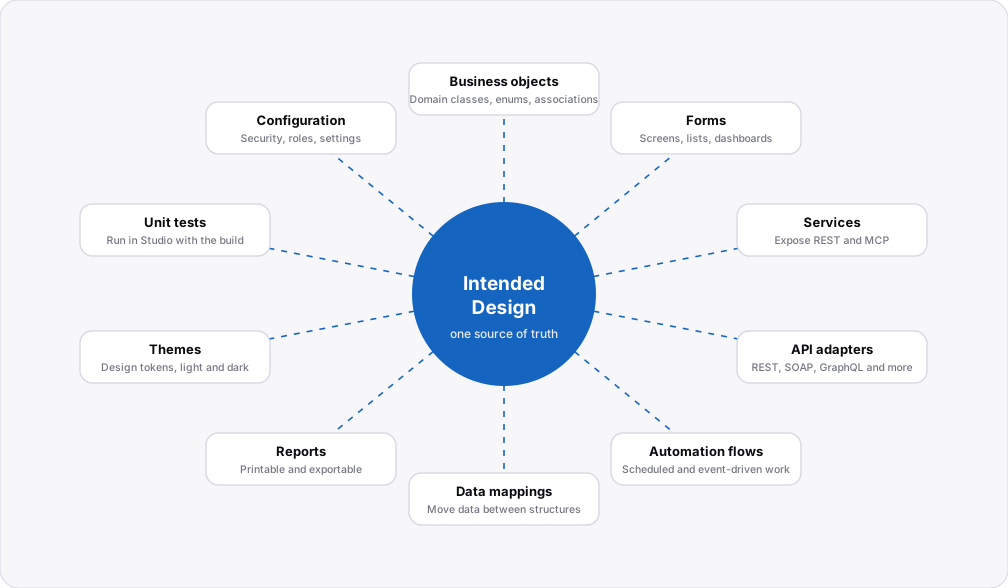
This chapter covers each editor, and the controls you place on a form, so you can see what can be done and how.
The editors
-
Capture business entities and their relationships. It is where the application's database and other data structures are defined: classes, enumerations and associations.
-
Build the user interface visually from pre-made components that reuse your business objects: web forms, master pages and partial views, with datasets, validation and logic. Interfaces are translatable by default, and you can extend the default components with your own.
-
Design the service layer of your application as REST or MCP services, with operations and data contracts.
-
Integrate with other systems: REST and SOAP services, external libraries, XSD files, and queries to your database.
-
Define work that runs on a schedule or on an event, as steps written in the language.
-
Map one structure onto another and generate the transformation code.
-
Design printable and exportable documents.
-
Set the look and feel of the application: global variables, variations such as light and dark, component styles and your own LESS code.
-
Write and run tests for the logic of your application.
-
Application settings, security, roles and permissions, and the target.
All logic in all of these editors is written in the same language.
Where to start
- Describe your data first in the Business Objects Editor. Almost everything else builds on it.
- Build screens in the Form Editor, using the Controls.
- See it working in the Hello World tutorial, where Studio creates a list and a form from a class.