API Adapters
This feature allows you to integrate your application with external systems and data structures that are not defined as Business Objects. It supports several connectivity types with foreign sources: RESTful APIs, SOAP APIs, libraries (DLL), GraphQL and messaging (RabbitMQ). It can also parse XSD files and generate the data structures, and let you create and use custom queries to a database, the application's own or an external one.
Creating an API adapter endpoint
Right-click API Adapters in the Project Explorer and choose Add..., or use the New button of the Taskbar and choose the API adapter category. Both open the Add new item window.
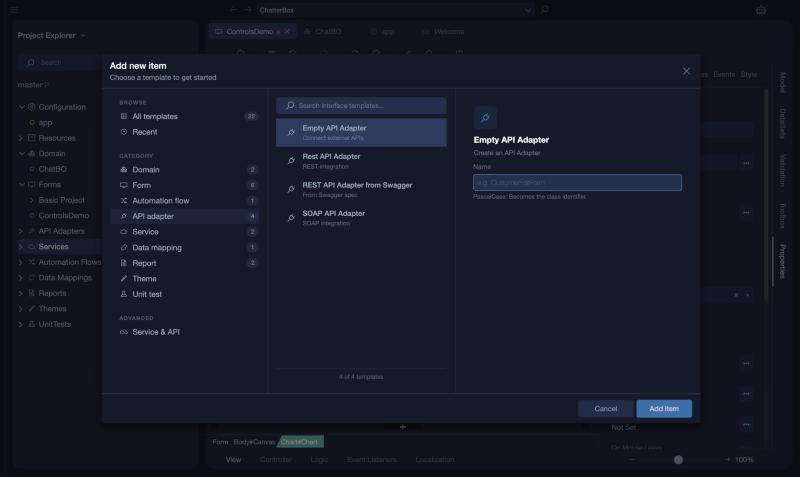
There are four templates: Empty API Adapter (Connect external APIs), Rest API Adapter (REST integration), REST API Adapter from Swagger (From Swagger spec), which reads a Swagger specification and creates the operations and structures for you, and SOAP API Adapter (SOAP integration). We continue with the empty one to cover the editor in full detail.
Enter a name for your API adapter and press Add.
The editor opens with its three tabs in the lower left corner: Interface, Operations and Structs. A new empty adapter has a Definition with a Type to choose, and a Security section.
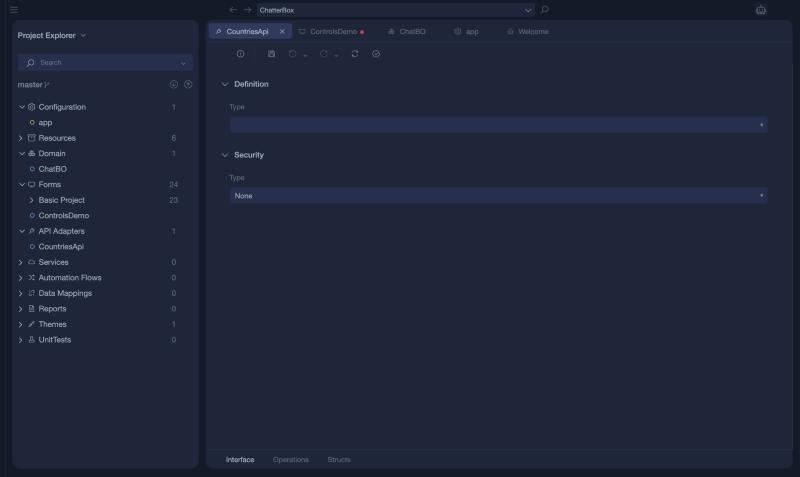
Editor Overview
The editor has its options in three tabs:
Interface
The Interface tab lets you define the type of the External Source and setup its details.
Operations
In the Operations tab you can setup and configure any functionality that's available under the endpoint you're trying to integrate with your application.
Structs
Here the data structures that are used in the endpoint's response can be defined and used easily across your application code.