Automation Flows
An automation flow is a model for work that runs without a person: on a schedule, or when something calls it. Use it for nightly imports, reminders, clean-ups, reports sent by e-mail, and any job that must run by itself. In older material it is called a workflow.
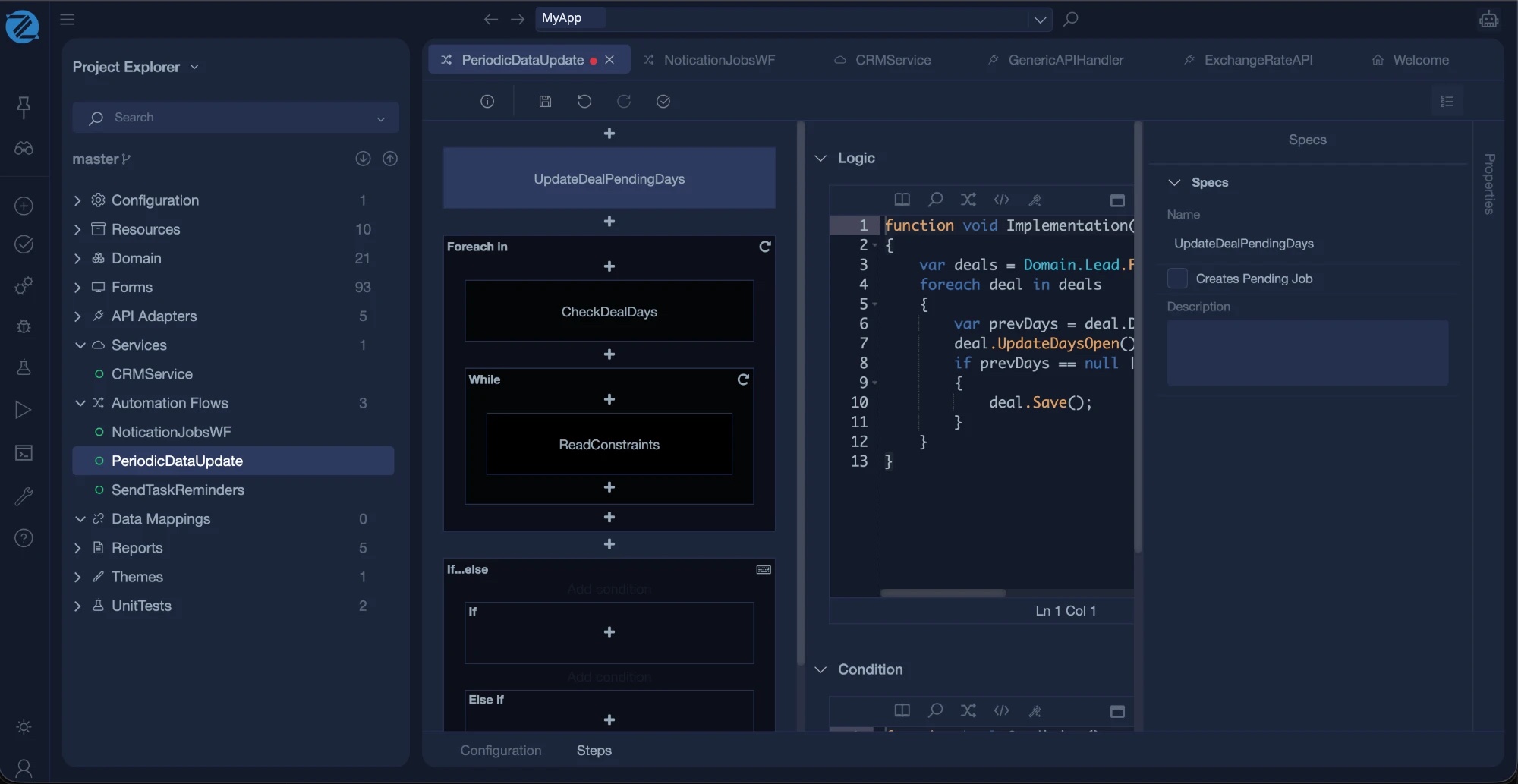
To create one, open Add new item, choose the Automation flow category and the Empty Automation Flow template, and give it a name.
The editor
The editor has two tabs at the bottom: Configuration and Steps.
Configuration
| Section | What it holds |
|---|---|
| Inputs | The values a flow receives when it starts. Click Add to define one. Each input has a data type, a name and a Persisted setting. A new flow has no inputs. |
| Scheduling | Tick Enable Scheduling to run the flow by itself. Set an optional Start and End date and time, and a cron trigger expression made of Minute, Hour, Day, Month and Weekday. |
A cron expression says when a flow repeats. For example, a flow that runs every night at 02:00 has the minute set to 0 and the hour set to 2, and every other field left open.
Schedules run in the generated application
The generated application registers the schedules when it starts. Make sure the application is built and running for a flow to fire.
Steps
The Steps tab shows the flow as a column of steps, with a + between them to add more. Click a step to see its properties on the right, and use the button at the top right to switch to the code of the step.
| Step type | Use it to |
|---|---|
| Normal Step | Run a piece of Mamba. |
| Run Workflow | Start another automation flow. |
| Foreach Step | Repeat steps for each item of a collection. |
| While Step | Repeat steps while a condition is true. |
| Do...While Step | Repeat steps, and check the condition after each pass. |
| If...Then...Else | Choose between two paths. |
What a step has
| Part | Description |
|---|---|
| Name | The name of the step, such as Step0 by default. |
| Description | A note about what the step does. |
| Logic | The Mamba code of the step. It is an operation named Implementation, in which you read and write business objects, call API adapters, apply data mappings, build reports and send e-mail. |
| Condition | A second piece of Mamba that returns true or false. By default it returns true. Use it to decide whether the step runs. |
| Creates Pending Job | Marks the step as one that creates a pending job. |
| Available To All Anonymous | Anyone can start the step, including users who are not signed in. |
| Available To Authenticated | Signed-in users can start the step. |
Check who can start a step
A new step is available to anonymous and to authenticated users. If a step can be started from outside, restrict it to the permissions it needs. See Permissions.
Example: a nightly clean-up
- Create a flow named NightlyCleanup and enable scheduling, with the minute set to 0 and the hour to 2.
-
Add a Normal Step named DeleteExpired, and write its logic:
-
Build and run. The flow runs at the scheduled time. Write to the log, as above, so that you can see in the application logs that it ran.
In the generated application
For the .NET and Angular strategy, an automation flow produces workflow code, with its schedules registered at start-up. See Enterprise Web.