What is zAppDev?
zAppDev is a browser-based platform that connects natural language AI to software engineering. Prompt-to-code leaves design implicit. zAppDev makes it explicit as an Intended Design, checked as a whole across database, server and screens before any code is produced. The engine then produces ordinary full-stack source code for your target stack, yours to download, deploy and run anywhere. Every service can become an MCP tool, automatically.
Create your free account Hello World tutorial
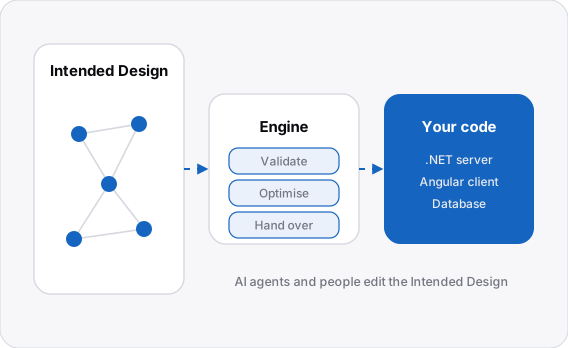
How it works
People and AI agents work on one Intended Design. The engine checks it as a whole and produces the code for your target stack, and you run it on your own servers.
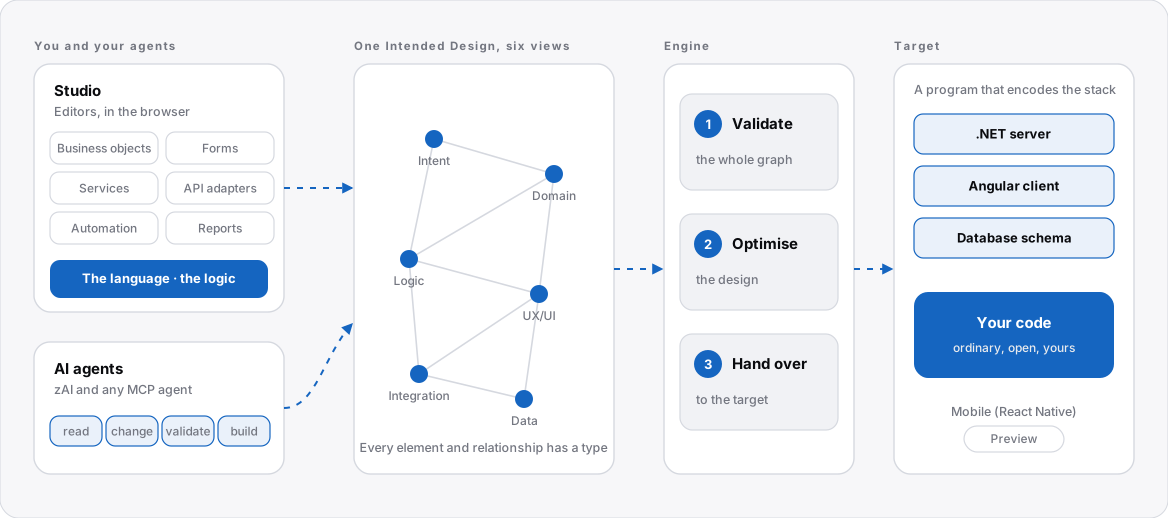
- Describe. In Studio you describe the application in editors and write its logic in the language.
- Check. Click Build. The engine checks the whole Intended Design and optimises it, and the full-stack target produces the .NET server, the Angular client and the database.
- Run. Run the application from Studio, or download the code, or deploy it to your own servers.
Note
The full-stack target produces .NET and Angular. A React Native mobile target is in preview. See What is available.
Why use it
- You own the code. Download the generated solution at any time and deploy it without depending on zAppDev.
- One Intended Design. The application is one connected description, so a change in one place is checked against everything related to it.
- Less hand-written code. Repetitive structure is generated, and your logic is written once, in the language.
- Documentation from the Intended Design. Design documentation can be generated from the Intended Design. See Download and export.
- Ready for AI agents. Every application has its own MCP server, so zAI and other agents work under the same checks as a person. See AI and MCP.
Core components
| Component | What it is |
|---|---|
| Studio | The web-based workspace: editors for business objects, forms, services, API adapters, automation flows, data mappings, reports, themes, unit tests and configuration, plus tools for version control, validation, deployment and code browsing. See Workspace. |
| The language | A typed, C#-like language for the logic of the application. It is used in class operations, form actions, service operations, automation steps and tests, and it is checked against the whole Intended Design. See the language. |
| The engine and its targets | The engine checks and optimises the Intended Design, then hands it to a target: a program that encodes the patterns, architecture, libraries and security of a stack. See The engine and Targets. |
The editors
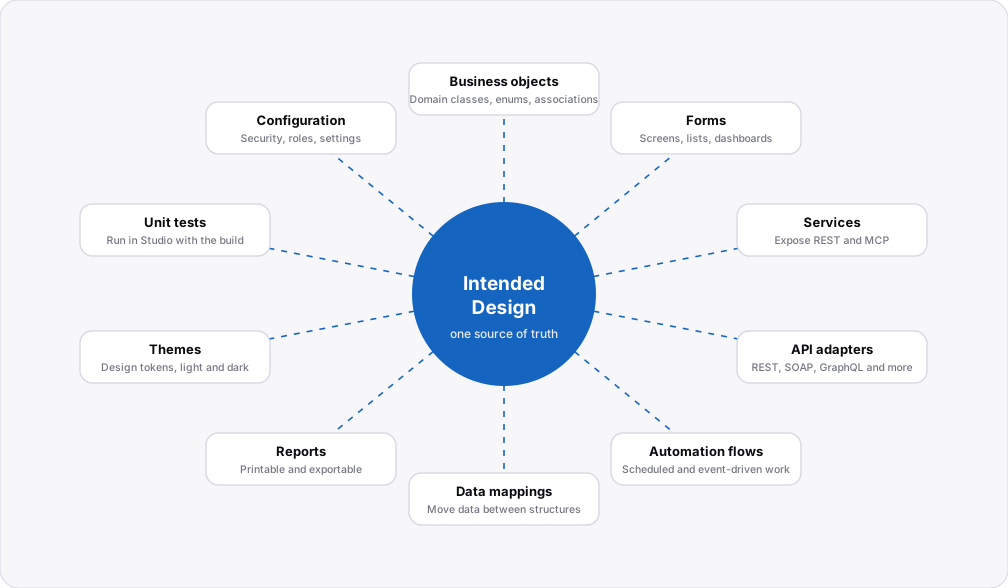
Each editor works on the same Intended Design, so every element knows what it is related to. Each one also implements an established software-engineering standard, so good design is the default.
| Editor | Use it to | Built on |
|---|---|---|
| Business objects | Define domain classes, enumerations and associations. | Domain-driven design |
| Forms | Design screens, master pages and reusable partial views, with their controller logic. | MVC |
| Services | Expose operations as REST or MCP. | SOA |
| API adapters | Call other systems: REST, SOAP, external libraries, XSD files and database queries. | APIs |
| Automation flows | Run scheduled and event-driven work. | BPM |
| Data mappings | Move data between structures. | Best practice |
| Reports | Produce printable and exportable documents. | Best practice |
| Themes | Set design tokens, variations, component styles and your own LESS. | Best practice |
| Unit tests | Write tests in the language and run them in Studio with the build. | Best practice |
| Configuration | Application settings, security, roles, permissions and the target. | Applies to every view |
Working with AI agents
zAI works inside Studio. Any agent that speaks the Model Context Protocol (MCP) can connect to an application with a scoped access token, and its changes are validated before any code is produced.
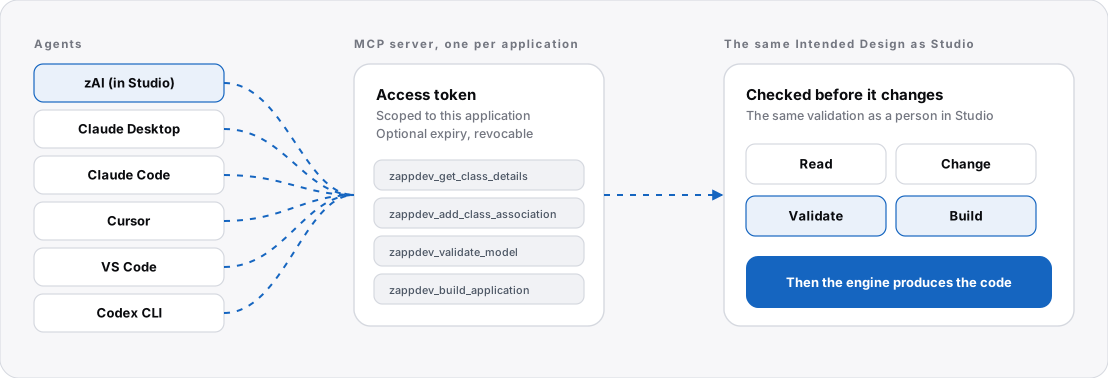
- Every application has its own MCP server.
- Access tokens are scoped to the application, can have an expiry date and can be revoked at any time.
- Agents can read the Intended Design, change it, validate it and build it, under the same checks as a person working in Studio.
- A service of type MCP becomes a tool that registers automatically in the application's MCP server.
The checks cover structure, not meaning
It finds broken relationships and wrong types, not wrong business rules, so tests still matter. See Unit tests.
What you control
What you get
- Download and deploy the generated code without depending on zAppDev.
- Extend the application with your own libraries, custom HTML forms and JavaScript.
- Write your own target.
- Download the Intended Design files. See Download and export.
What to know
- Generated files are overwritten on every build, so changes belong in the Intended Design or in the language.
- If you stop using zAppDev, you keep the code and maintain it yourself.
- Validation checks structure and relationships, not whether a business rule is right.
- Logic that calls .NET libraries stays tied to .NET.
What is available
| Capability | Status |
|---|---|
| Studio editors, the language, validation, version control, deployment | Available |
| Generation of .NET and Angular applications | Available |
| MCP server for every application, and zAI | Available |
| Live demos: Lite ERP and Issue Manager | Available |
| React Native (Expo) mobile target: client only, REST GET and POST | Preview |
| More demos: POS, Charts, Swagger | Planned |
Where to start
- Create an account at ide.zappdev.io and open a template: Empty, or Web application with sign-in, users and roles. See New Project.
- Follow Hello World. The tutorial series builds a first application, then Music Store, ChatterBox and My Store.
- Open a live demo. Lite ERP and Issue Manager are finished applications you can use.
Explore the documentation
-
Tutorials that build real applications, from Hello World to a music store, and how-to guides for common tasks.
-
Studio: the control panel, the Project Explorer, adding items, the console, and the tools for version control, validation, export and deployment.
-
The editors for business objects, forms, services, API adapters, automation flows, data mappings, reports, themes and tests, and the controls of a form.
-
What a target is, the full-stack target (.NET and Angular), the React Native preview, and the engine.
-
The language for the logic of your application: a tour, types, data, behaviour and syntax.
-
zAI in Studio, and connecting your own agent to the MCP server of an application.
-
The glossary, the libraries of the language, the keywords and the JavaScript API.