Button
A button lets the user trigger an action: save a record, open another page, run a calculation. It runs a controller action written in Mamba, or opens a form.
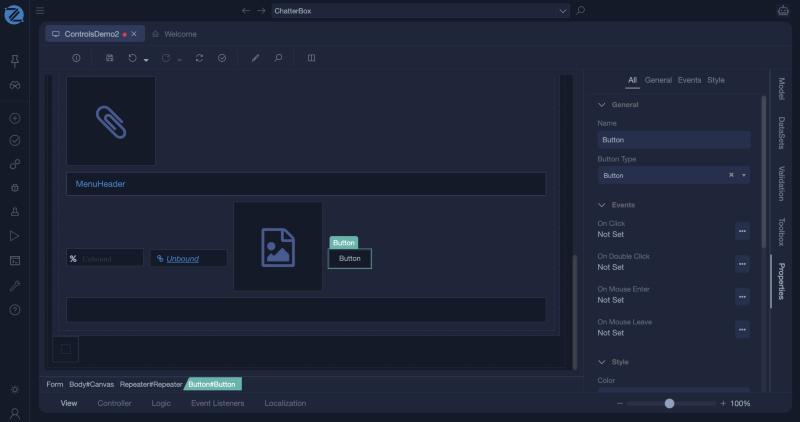
A button contains a label that holds its text. When you click a button on the canvas, you often select the label inside it. To select the button itself, click the button in the path shown at the bottom of the editor.
Properties
| Section | Property | Description |
|---|---|---|
| General | Name | The unique name of the control. |
| General | Button Type | The kind of button: Button, Link, Image or ListButton. See below. |
| Events | On Click | What happens when the user clicks. See below. |
| Events | On Double Click | What happens on a double click. |
| Events | On Mouse Enter | What happens when the pointer enters the button. |
| Events | On Mouse Leave | What happens when the pointer leaves it. |
| Style | Color | The colour role of the button, such as Primary or Danger. The roles come from the theme. |
| Style | Size | The size of the button. |
To change the text, select the label inside the button and set its Caption.
Button types
| Type | Look and use |
|---|---|
| Button | A normal button. |
| Link | A button that looks like a link. |
| Image | A button that shows a picture. |
| ListButton | A button that belongs to a Data List and acts on its rows. Its visibility decides when it shows: Always (any number of rows selected, including none), Single (exactly one row selected) or Multiline (several rows selected). The Add and Edit buttons the wizard creates are list buttons. |
The On Click event
Click the three dots next to On Click. The window Event On Click of control opens.
| Field | What to choose |
|---|---|
| Action Type | Form Controller Action runs an action of a form. |
| Form | The form that owns the action. this means the current form. |
| Controller Action | The action to run. Choosing another form's entry point opens that form. |
| If the user is not in role | What to do when the user lacks the permissions of the action. Hide the element is the default. |
| Disable element during execution | Prevents a second click while the action runs. |
| Trigger With Enter Key | Runs the action when the user presses Enter. |
| Trigger With Esc Key | Runs the action when the user presses Esc. |
| Show Confirmation | Asks the user to confirm before the action runs. |
Buttons follow permissions
A button that runs an action inherits the permissions of that action. For a user who does not have them, the button is hidden. If a button is missing from a running page, check the permissions of its action first.
Example: open another page
- Add a Button to the form and set the caption of its label to Next.
- Open On Click, choose the form SecondPage and the action Index, and click OK.
- Save, build and run. Clicking the button opens SecondPage.
The Hello World tutorial walks through this.
Example: run an action and stay on the page
Create a non-entry-point action, for example Save, and choose it in On Click. It runs on the server without rendering the form again.
In Studio
The button's Properties panel: Name, Button Type, the four mouse events and the style (Color, Size, Variation, CSS Classes, Css Style).