Choose a pattern, don't invent one
Best practice comes as ready-made building blocks. For a plain list of records, that block is the List control. You choose it by name, and the engine produces the implementation. This page shows the same screen built two ways, so you can see what each costs. Every number is for this one example.
The List control is one example. The other components, such as charts, calendars, maps, pickers, modals and file uploads, work the same way: you choose them by name, bind them to the view model, and drive them from Mamba.
The example
The screen lists the orders of a small order application. Each order shows its customer, date and status, and can be confirmed. The rules behind the Confirm button, and the six unit tests that check them, are the same in both builds.
| In this example | Custom build | Native List control |
|---|---|---|
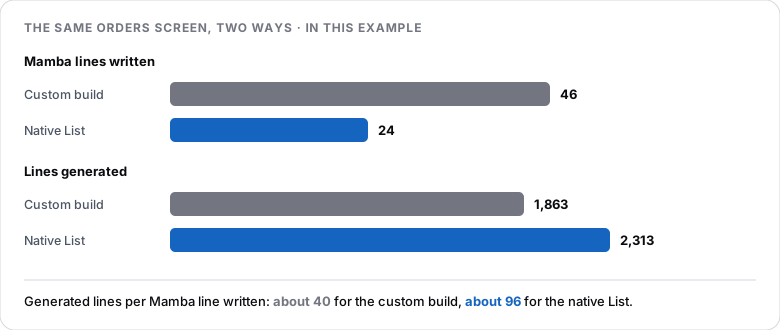
| What you write | A helper class, a row-building operation, 46 lines of Mamba, 8 view-model entries and 8 hand-written styles | A dataset and a list with four columns, and 24 lines of Mamba |
| What is generated for you | The list as written: 1,863 lines | The list, plus a server-side data source, saved views with sharing and download: 2,313 lines |
| Changing a column | Four places: the helper class, the row-building operation, the view model and the layout | One column |
| The rules and tests | Six tests pass | The same six tests pass, unchanged |
In this example, 24 lines of Mamba produced 2,313 lines of generated code, about 96 for every line written. The custom build produced about 40 for every line written.
The custom build
A repeater with a row for each order. The rows come from a helper class that is filled by an operation:
static function Collection[Domain.OrderRow] BuildRows() {
    Collection[Domain.OrderRow] rows;
    foreach o in Domain.CustomerOrder.GetAll() {
        var row = Domain.OrderRow.Create();
        row.OrderId = o.Id;
        row.Customer = o.Customer.Name;
        row.OrderDate = o.OrderDate.ToString();
        row.Status = "Open";
        ...
        rows.Add(row);
    }
    return rows;
}
The screen also needs the helper class OrderRow, a view model that mirrors it, and layout and styles written for each control. A button and the total appear on every row.
The native List
A dataset reads the orders. The list shows four columns. Two list buttons, Confirm and Show total, act on the selected order and call the same rules as before. There is no helper class and no row-building code.
What the extra generated code is
The native form's generated controller has methods that the custom form's does not: a server-side data source for the list, saved list views (save, delete, load, favourite, hide) with sharing to users and roles, and file download. The list control carries its own client code too. This is code you did not have to write or keep up to date.
What was and was not checked
The counts are lines in the generated files that belong to each form, read from a real build of one application, and the helper class of the custom build is counted with it. The generated methods are present in the code. We did not test each list feature on the screen, nor which ones the list's settings switch on. More generated code is not better by itself: the point is that it is code you did not write.
When a custom layout is right
Use a custom layout when the standard control cannot express what you need, for example a card or tile layout, or an unusual row design. The custom build in this example also had two things the list does not: a button on every row, and the total in each row. Those are real advantages, and they cost a helper class and hand-written styles.
How to choose
- Is there a standard control for this? For a list of records, there is.
- Does it cover the need? Check the columns, the actions and the behaviour you need.
- If not, what exactly is missing? Name it. It is often small.
- Is the custom part small? If so, use the standard control for the rest.
What stayed the same
Changing the screen did not touch the rules or the tests. The six tests passed before and after. This is one reason to keep logic in the model, apart from the interface. See Intended Design.
Related
- Controls: the building blocks of a form.
- Intended Design: what the model contains and why it matters.
- Unit tests: how rules are checked.