Intended Design
The Intended Design is the central idea of zAppDev. It is the application as people think about it: purposes, business concepts, rules and screens, and the links between them. Written down, it is the complete, connected description of one application: its data, its screens, its services, its logic, its look, its security and its settings. The engine checks it. You work on the Intended Design in Studio, and everything else, including the running application and its code, is produced from it.
This page has three parts and a set of questions. The concept explains what the Intended Design is and why it matters. The Intended Design in the AI era explains why an Intended Design is a better thing for an AI to work on than a code base alone, and where it is not. The technical view explains how it is organised and how it behaves when you edit, validate, store, share and build it. Frequently asked questions answers the questions that come up next.
The concept
An Intended Design, not a pile of code
In a conventional project, the application is its source code, and the design lives in people's heads and in documents that drift away from the code. In zAppDev the Intended Design is the source of truth. You describe the application, and the engine produces the code.
Three consequences follow:
- Changes go into the Intended Design. The generated code is overwritten on every build, so you do not maintain it by hand. Behaviour that the editors cannot express is written in the language, which is part of the Intended Design.
- The Intended Design describes the whole application. The code of a stack, such as .NET and Angular, is one possible output. A different target can produce a different output from the same Intended Design.
- People and AI agents work on the same thing. An agent that connects through MCP reads and changes the same Intended Design that you see in Studio.
One Intended Design, ten editors
Each editor in Studio works on the Intended Design, not on a separate file format that you have to keep in line with the others.
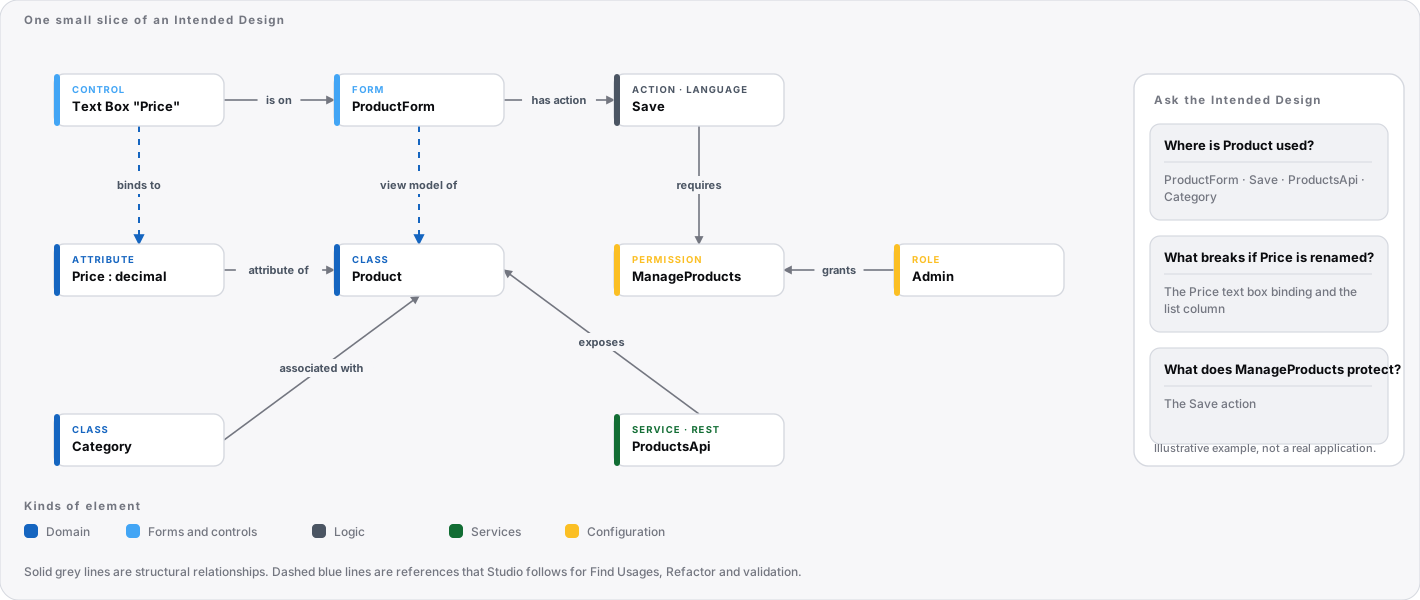
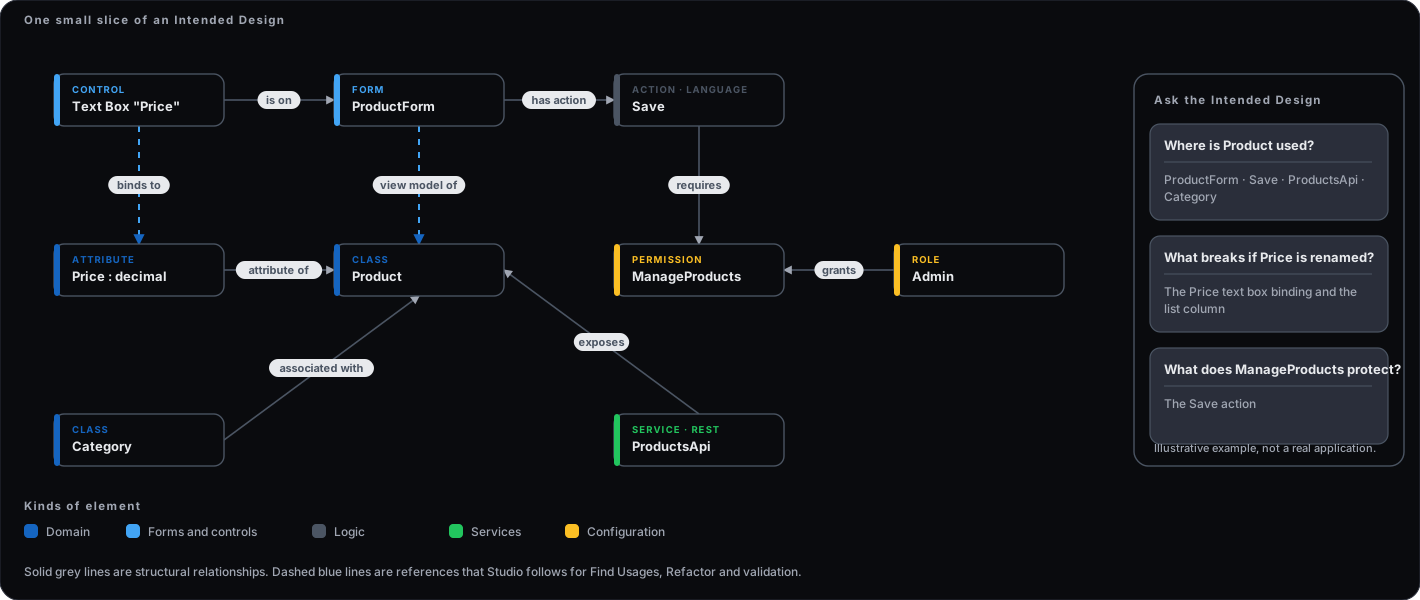
The Intended Design is made of elements such as a class, an attribute, a form, a control, an operation, a role or a theme variable. Elements are related to one another. A form control is bound to a member of the form's view model. A button's On Click names a form and an action. A service operation uses a class. A permission restricts an action. Because the Intended Design is connected, Studio can answer questions that a folder of files cannot:
- Where is this class used?
- What would break if I rename this attribute?
- Which actions does this permission protect?
What is in the Intended Design
The Intended Design is organised by kind. The Project Explorer of an application lists the kinds, each with its own editor:
| Kind | What it describes |
|---|---|
| Configuration | Settings, roles, permissions, authentication, localisation and the choice of target. |
| Resources | Binary resources such as images and files. |
| Domain | Business objects: classes, attributes, enumerations, associations and class operations. |
| Forms | Screens, master pages and partial views, with their view model, controller actions and logic. |
| API adapters | The external services the application calls. |
| Services | The services the application exposes, as REST or MCP. |
| Automation flows | Scheduled and event-driven work. |
| Data mappings | Moving data between structures. |
| Reports | Printable and exportable reports. |
| Themes | Design variables, components, styles and icons. |
| Unit tests | Tests of the logic. |
Each kind is a model, and the Intended Design is all of them together. The Download Models window also lists Snippets beside these kinds.
Structure and behaviour
The Intended Design has two parts. The structure is what you draw and fill in with the editors: classes, forms, controls, services and settings. The behaviour is the logic you write in the language: operations of classes, actions of forms, operations of services and flows. Both parts are checked together, so an expression in the language that uses a class that does not exist is found before anything is built.
From Intended Design to running application
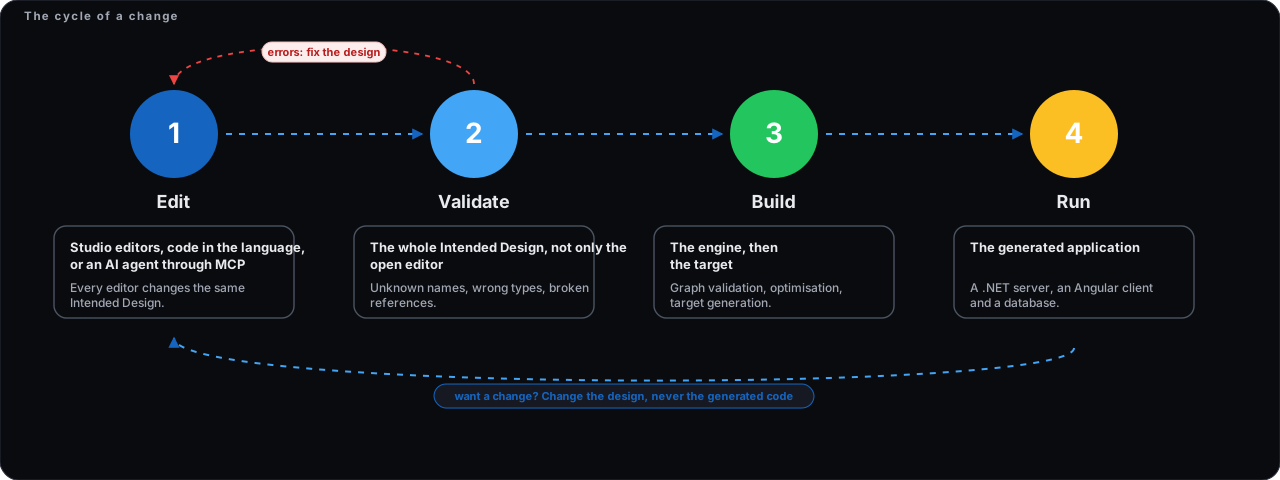
An application moves through a short cycle:
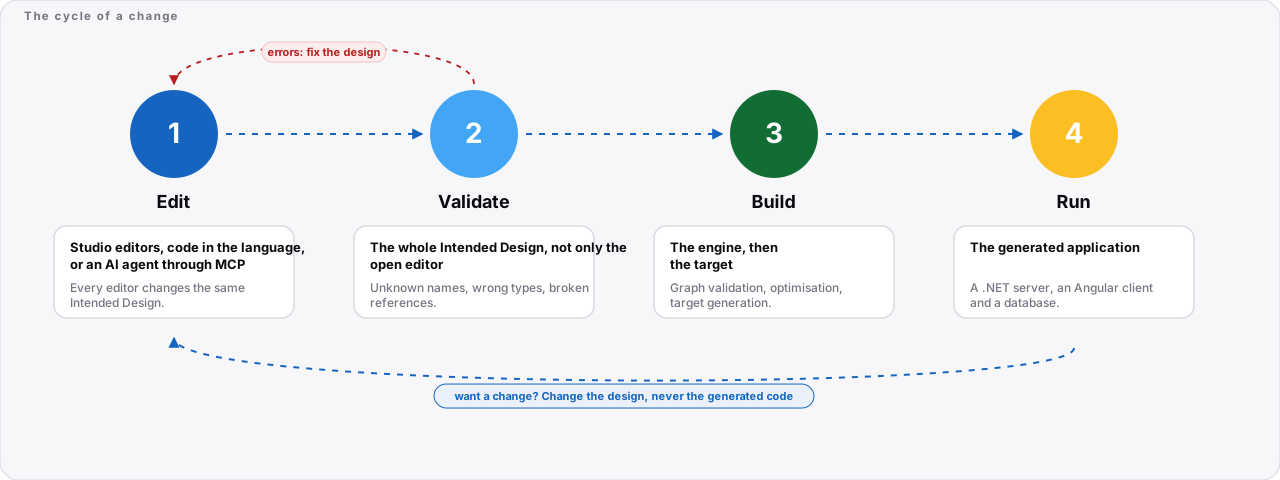
- Edit the models in their editors.
- Validate: the whole Intended Design is checked for broken relationships and wrong types. See Validation.
- Build: the engine validates and optimises the Intended Design, and a target produces the application. See The engine.
- Run the result, and go back to the Intended Design to change it.
Validation and the build look at the Intended Design as a whole. A build does not start from an Intended Design that fails validation.
Built on patterns
The Intended Design is not a blank page. It is built around established patterns, standards and architecture, and they are integrated so that they work together. You choose a pattern by name, and the engine produces its implementation. Examples:
- The controls are ready-made components, such as lists, charts, calendars, maps, pickers, modals and file uploads. Each is bound to the view model, fed by a dataset and driven from the language in the same way. The List example shows what that saves.
- An association states how many, who can navigate, and what happens on delete.
- A permission protects an action, and a role groups permissions. See Configuration.
- The whole Intended Design is validated before a build. See The engine.
- A target applies the architecture, libraries and security of a stack as a program, to every file.
These are examples, not a complete list.
The Intended Design in the AI era
AI coding tools can now produce code faster than any team can review it. In zAppDev, the engine produces the code from an Intended Design that is checked first. So the question is not which of them produces code. The question is what each one works from, and where a wrong answer is caught.
Two ways to use AI
| AI on a code base | AI on an Intended Design | |
|---|---|---|
| What it works on | Large text, with relationships implied | A typed structure, with relationships stated |
| How it finds context | Searches and infers, so it can guess wrong | Asks the Intended Design, for example where an element is used |
| When a wrong change is caught | Often at build time or at runtime | At validation, with an error that names the element |
| Consistency across many screens | Decided again each time | Set once in the engine and the target, then applied to every screen |
| What a developer reviews | A large diff of generated code | A change to the Intended Design |
| What a fix looks like | A patch to generated files | A change to the Intended Design, which regenerates the code |
Both approaches end in ordinary source code that you can read.
What an Intended Design adds
- Less to read for a given question. The Intended Design carries no implementation detail, and an agent reads the element it needs, such as one class or one form, through targeted tools, instead of searching files. In size, the Intended Design is smaller than the generated code by line count and more modestly by bytes, because model files are verbose. A measurement on one large application is in the reference book.
- Stated relationships. A form control is bound to a field, a button names its action, and an association states its multiplicity and what happens on delete. An AI does not have to infer these from text.
- Failure early. Validation checks the whole Intended Design before a build. An invalid change stops there, and the error says which element is wrong.
- Consistent output. The engine and the target carry the architecture and the experience of how to write it, as a program, so an AI does not have to decide them again for every file.
- Reviewable changes. A change to the Intended Design is a small, named change that can be reviewed and kept in Git history, instead of a large diff of generated files.
- Output that can be replaced. The generated files are rebuilt on every build. A mistake in them is fixed in the Intended Design and removed everywhere it applied, not patched in one place.
How an agent works with the Intended Design
An AI agent connects to the application's MCP server with a token that is scoped to that application. The usual order is the same as a careful developer's:
- Read what exists: the business objects, forms, services and settings, and an existing example to follow.
- Change the Intended Design: add a class, an attribute, a form or a service operation.
- Validate. If the change is wrong, the error names the element. The agent corrects it.
- Run the tests, and build. Nothing is generated until the Intended Design is valid.
The list of tools is in MCP tools. Every change an agent makes goes through the same validation as a change made in Studio.
Where code is the better choice
An Intended Design is not the right tool for everything.
- New algorithms and unusual stacks. Something that has no place in the Intended Design is easier to write as plain code. Logic is written in the language, and external libraries and custom libraries can be called from the Intended Design.
- Performance-critical code. Where every instruction matters, direct control of the code is an advantage.
- Familiarity. AI knows common programming languages better than the language of zAppDev. The MCP server and the documentation give it the vocabulary of the Intended Design, but the gap exists.
- An Intended Design has a shape. It describes structured, repeated, relational applications well. It limits what you can express directly, which is the point of it and also its cost.
A practical way to see it: the Intended Design carries what is structured and repeated, such as data, screens, services, security and look. Code carries what is new.
What has not been measured
This page makes no claim about cost or speed. It is likely that an AI working on an Intended Design reads less and makes fewer mistakes than one working on a large code base, but that is a hypothesis, not a result. A fair comparison does the same tasks both ways and records the cost, the time, the review effort, the errors found at each stage and whether repeated runs agree. Until that is done, treat the points above as reasons to try the Intended Design approach, not as proof that it is cheaper.
A small benchmark was run on one application: three tasks (find where a field is used, rename a class, add a field and show it on a form), once through the Intended Design and once on the generated code. Validation found every broken use after a rename (8 of 8), and the Intended Design tools returned much less text than the generated code for the same class or form. But a search over the Intended Design found only 25 of 34 references, because it covers code and not control bindings, and renaming a class does not update its references. The cost and speed of the two routes were not compared. The results are in the reference book, chapter 9.
The technical view
Elements and the shape of an Intended Design
zAppDev knows a fixed set of element types and the named relationships that are allowed between them. This set is the shape of every Intended Design. Every Intended Design is a connected graph of elements that follows it. Two things follow:
- Validation compares your Intended Design with that shape and reports what does not fit, for example a name that does not exist in the current context. The result lists the description, the location (the element and the position in the code), the type of element and the model it belongs to.
- The editors work on this graph. When you select a control in the Form Editor, you select an element of the graph, and the Properties panel shows its attributes and relationships.
References
Elements refer to one another, not to copies of one another. Some references you can see in the editors:
- A control's Model Binding names a member of the form's view model.
- A button's On Click names a form and an action, shown as, for example, ProductForm / Add.
- An association connects two classes of the business objects.
- A theme component refers to theme variables.
Because references are kept in the Intended Design, Studio can work with them. The context menu of a model in the Project Explorer offers Refactor and Find Usages, and a model can be moved to a module with Move To Module.
Storage: one unit per model
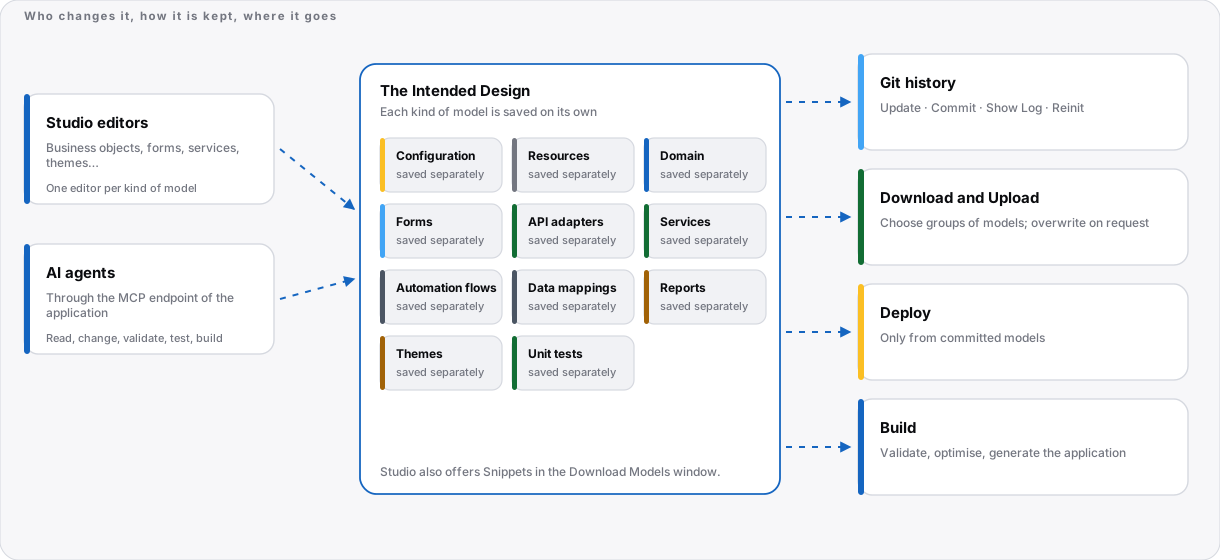
Each model is saved on its own. An editor tab with unsaved changes shows a marker, and closing it asks whether to save. This is also the unit of sharing:
- Download (Tools, File Management) lets you choose which groups of models to download: Configuration, Binary Resources, Forms, Domain, Automation Flows, API Adapters, Services, Data Mappings, Themes, Snippets, UnitTests and Reports.
- Upload puts models into the open application, from a file selector or by drag and drop. A model with the same name makes the upload fail unless you tick Overwrite Existing Models.
- Restore Models and Manage Modules are in the same group. See Download and export.
The files that Studio produces are an internal exchange format. Do not edit them by hand; upload and validate them in Studio instead.
What a download contains
A download is a folder per kind of model, with one file per model. This is what the download of a real application in Studio 10.7.0 contained (a small team application with ten forms of its own and the forms of the Web Application template):
| Folder | Contents |
|---|---|
BusinessObjects |
One XML file for the business object: its classes, enumerations, associations and class operations |
Webforms |
One file per form, 33 in all. Each is a JSON document with the actions, event listeners, resources, view model, data sets, conditional formatting, validations and the tree of controls |
Configuration |
app.xml: the application's name, authentication type, roles, permissions and settings |
Theme |
One XML file for the theme: its variables, components and style rules (the largest file of the download) |
UnitTests |
One JSON file for each unit test model |
Snippets |
A JSON file of reusable control snippets |
Resources |
Binary resources such as images and style sheets |
The download of this application was 46 files and about 5.5 MB, or 631 KB zipped. The files carry a licence comment at the top. The format is internal and can change between versions, so use the files to move models between applications, not as an interface to edit by hand.
History
The history of the Intended Design is kept in Git. The Project Explorer shows the branch you work on, and Update, Commit, Show Log and Reinit are in the Tools menu. A deployment is made from committed models, and it refuses to run while there are uncommitted changes. See Version Control and Deploying Applications.
Validation
Validation runs before a build and on demand, over the whole Intended Design, not only the open editor. It finds structural problems: unknown names, wrong types and broken references. It does not find wrong business rules, which is what unit tests are for. When validation fails, a build reports that the solution metamodel could not be obtained and asks you to validate to see the list of errors.
The build
A build takes the validated Intended Design through three steps: graph validation, optimisation, and production for the target you chose in the Configuration. The generated files are overwritten on every build, and an updated target can produce different code for the same Intended Design, so review the result of a rebuild. See The engine and Targets.
What a build produces
The solution generated for a real application in Studio 10.7.0 (the team application described above) had these parts:
| Part | Contents |
|---|---|
Projects/Domain |
The server-side domain: classes, data access, business logic, security and locales, and a project for unit tests |
<application>.Web |
The web application: controllers, view models, views, locales, configuration, and the Angular client (ClientApp) |
Docker |
Docker files and a compose file for local, development and deployment use |
hashes.txt |
A hash for each generated file, so that changes made to generated files can be detected |
CodeMaps |
operations.code-map.json, which maps each model operation, for example OP|Project|SeedSampleData, to the generated symbol and lines that implement it |
The solution file, nuget.config, third-party licences, build logs |
The usual files of a .NET solution |
The code map is what lets you go from a line of generated code, for example in a stack trace, back to the operation of the Intended Design that it came from. That solution had about 900 source files (130 C#, 698 TypeScript, 84 HTML), around 5.9 MB and 150,000 lines.
Working with the Intended Design from outside Studio
- Export the models and the generated code at any time. See Download and export. The code is ordinary source code, and you can keep it in your own Git repository.
- Export Domain Model and Domain Model Explorer (Tools, Semantics) are offered for the domain part of the Intended Design.
- AI agents can list, read, create and change elements, validate the Intended Design and run tests through the application's MCP endpoint. See MCP tools.
What the Intended Design does not contain
The Intended Design does not contain the generated code, which is rebuilt each time, nor the data of the running application, which lives in its database. It does contain what is needed to recreate both the code and the database structure.
Frequently asked questions
Can I edit the generated code?
You can read it and run it. But the generated files are overwritten on every build, so a change made there is lost the next time you build. Make changes in the Intended Design, or in the language, which is part of the Intended Design. If you take the code out and maintain it yourself, you give up regeneration, and you maintain it from then on. See Download and export.
What happens when the engine or a target is updated?
A target is kept up to date as a service. To adopt an update, build again. An updated target can produce different code for the same Intended Design, so review the result and run your unit tests before you deploy. See Targets.
How do I review what an AI agent changed?
Look at the Intended Design, not only at the code. The history of the Intended Design is kept in Git, and the MCP tools include ones that read the difference between versions. See Version Control and MCP tools.
Can an agent change anything it likes?
An agent connects with an access token that belongs to one application. Whoever holds a token can change that application's Intended Design, so give each agent its own token, set an expiry and revoke it when you stop using it. Every change goes through validation. See The MCP server.
What if the Intended Design is valid but the behaviour is wrong?
Validation finds structural problems: unknown names, wrong types and broken references. It does not find a wrong business rule. Check behaviour with unit tests and by running the application.
Is an Intended Design better than a code base for full-stack development?
For structured business applications, an Intended Design is a strong fit, because the hard part is how the data, the screens, the services and the security relate to one another, and the Intended Design states those relationships. For code that is new or performance-critical, plain code is easier. The two can be combined: use the Intended Design for what is structured and repeated, and the language or external libraries for what is new. There are no measurements yet that compare cost or speed.
What if I stop using zAppDev?
You can download the models and the generated solution. The generated code is ordinary source code that you can keep in your own Git repository and run on your own servers. See Download and export.
Does an Intended Design work with any AI tool?
A tool that speaks the Model Context Protocol (MCP) can connect to an application's MCP server. Studio shows ready-made configuration for Claude Desktop, Claude Code, Cursor, VS Code and Codex CLI, and a generic option for any other MCP client. See The MCP server.
Where do I start?
Open a small application in Studio, change one thing in an editor, and validate. Then read Editors for the editor of each kind of model, or follow Hello World.
Related
- Editors: one editor for each kind of model.
- Choose a pattern, don't invent one: the same screen built two ways, with the numbers.
- The language: how behaviour is written.
- The engine and Targets: from Intended Design to application.
- Glossary: the terms used here.