The engine
When you build, the engine turns the Intended Design into an application. It checks the whole Intended Design, optimises it, and hands it to a target, which produces the code.
Three phases
| Phase | What happens |
|---|---|
| 1 · Graph validation | The whole Intended Design is checked: missing links, type mismatches, broken references, and rules that contradict each other. See Validation. |
| 2 · Optimisation | The graph is simplified and normalised before anything is written. |
| 3 · Production for a target | The chosen target produces the code, the database and the interface for its stack. |
Errors stop the build. Warnings do not, but they often point at something worth fixing.
Where each kind of model ends up
See Enterprise Web for what each kind of model produces in the full-stack target (.NET and Angular).
From a stack trace back to the Intended Design
A code map links every generated method to the operation in the Intended Design it came from, line by line. When something fails at run time, the stack trace leads to an element of the Intended Design, not to a file you have to reverse-engineer.
The Intended Design is the source
- Generated files are overwritten on every build. Changes belong in the Intended Design or in the language.
- The code is open. You can read it, build it and host it. See Download and export.
- Rebuilding can change generated code. A target is kept current as a service, so build again after an update and review the result.
Build from Studio
- Rebuild All in the Tools menu rebuilds the application.
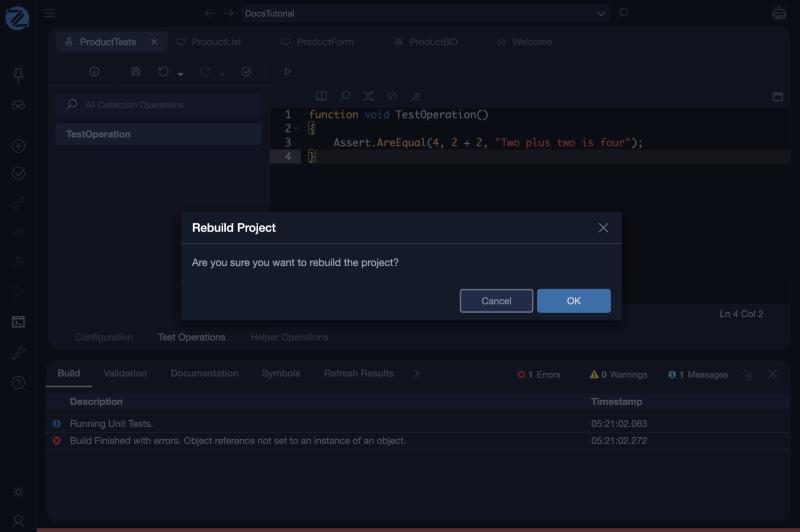
Rebuild All asks Are you sure you want to rebuild the project? Confirm with OK. Progress and the result appear in the Build tab of the console.
When the Intended Design has errors
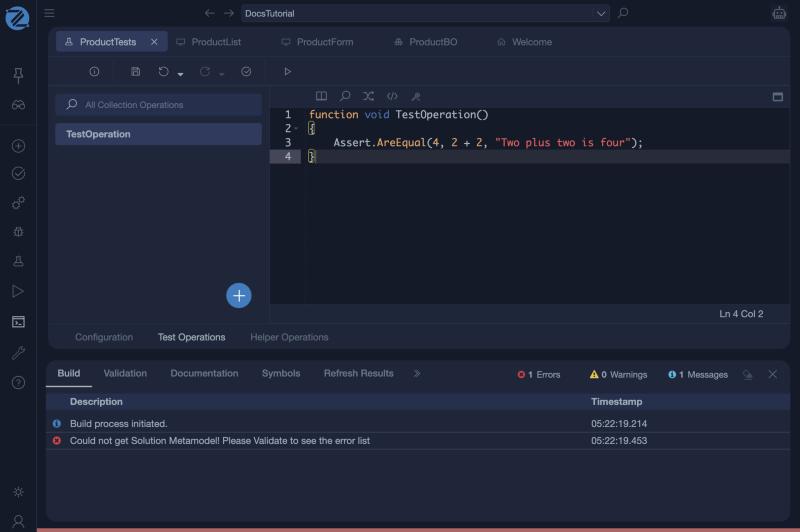
If validation finds errors, the build stops at the first step. The Build tab says Could not get Solution Metamodel! Please Validate to see the error list. Open the Validation tab to see the errors, fix them, and build again.
- Browse Solution's Code shows the generated solution inside Studio.
- Deploy and Deployment Environments deliver a numbered version. See Deploying Applications.