The MCP server
Every zAppDev application has its own MCP server. An AI agent that speaks the Model Context Protocol can connect to it to read the Intended Design, change it, validate it and build it, under the same checks that apply to a person working in Studio.
Connect an agent
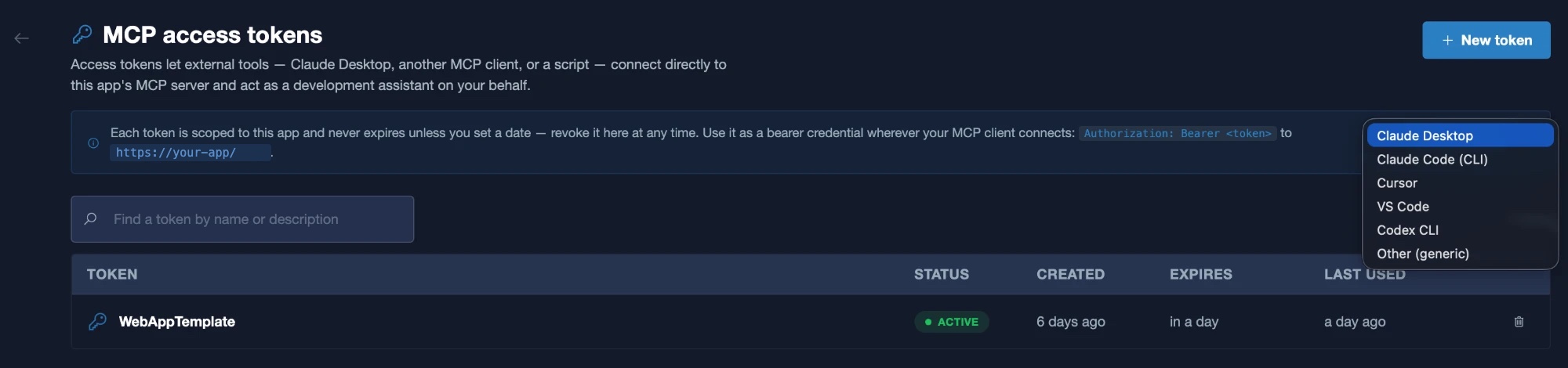
- Open the MCP access screen of your application in Studio.
- Create an access token. A token is scoped to this application. You can give it an expiry date, and you can revoke it at any time.
- Choose your client. Studio lists the configuration for Claude Desktop, Claude Code (CLI), Cursor, VS Code and Codex CLI, and a generic option for any other MCP client.
- Copy the configuration into your client. It contains the address of your application's MCP server, which Studio shows on this screen, and your token.
Treat tokens like passwords
Anyone who holds a token can change the model of the application it belongs to. Give each agent its own token, set an expiry where you can, and revoke a token you no longer use.
What an agent can do
An agent connected to the server can:
- Read the application: its business objects, forms, services, API adapters, themes, roles, settings and tests.
- Change the model: add classes, attributes and associations, create and edit forms, add service operations, and more.
- Check the model with validation, and run unit tests.
- Build the application and get its runtime address.
The full list is in MCP tools. Every change goes through the same validation as a change made in Studio, and nothing is generated until the model is valid.
A worked example
This session was run against a small team application through its MCP server. The agent made a change and then undid it. Every output is the one returned by the server.
| Step | What the agent did | What came back |
|---|---|---|
| Read | Asked for the application, its business objects, the classes of one, and the details of the class Project | Four business objects. For Project: seven attributes and two operations |
| Change | Added Budget, a persisted decimal, to Project | Accepted. The class shows Budget with precision 18 and scale 2, the defaults |
| Validate | Validated the business object | An empty list: no errors |
| Fail | Added an operation that uses p.Budgit, a misspelling of p.Budget |
Accepted by the tool, because the tool checks syntax only. Validation of the model then returned the error below |
| Correct | Replaced it with p.Budget and validated again |
An empty list |
| Test and build | Ran all unit tests, then built | 5 tests passed, 0 failed. The build generated 737 files in 14.7 seconds |
| Undo | Removed the operation and the attribute, validated, rebuilt, and ran the tests | The class was as before. The rebuild generated 148 files. 5 tests passed |
[{"severity":"Error",
  "description":"'Project' does not contain a definition for 'Budgit'",
  "navigationInfo":{"model":"StarterBO","modelType":"BusinessObject","symbolType":"Operation"}}]
The wrong name was found by validation, before any code was generated, and the error names the class, the model and the kind of element. The tool that returns the Git difference of one model failed with a server error in this session; the difference of the whole workspace, which lists each changed model, worked.
Expose your own application as MCP tools
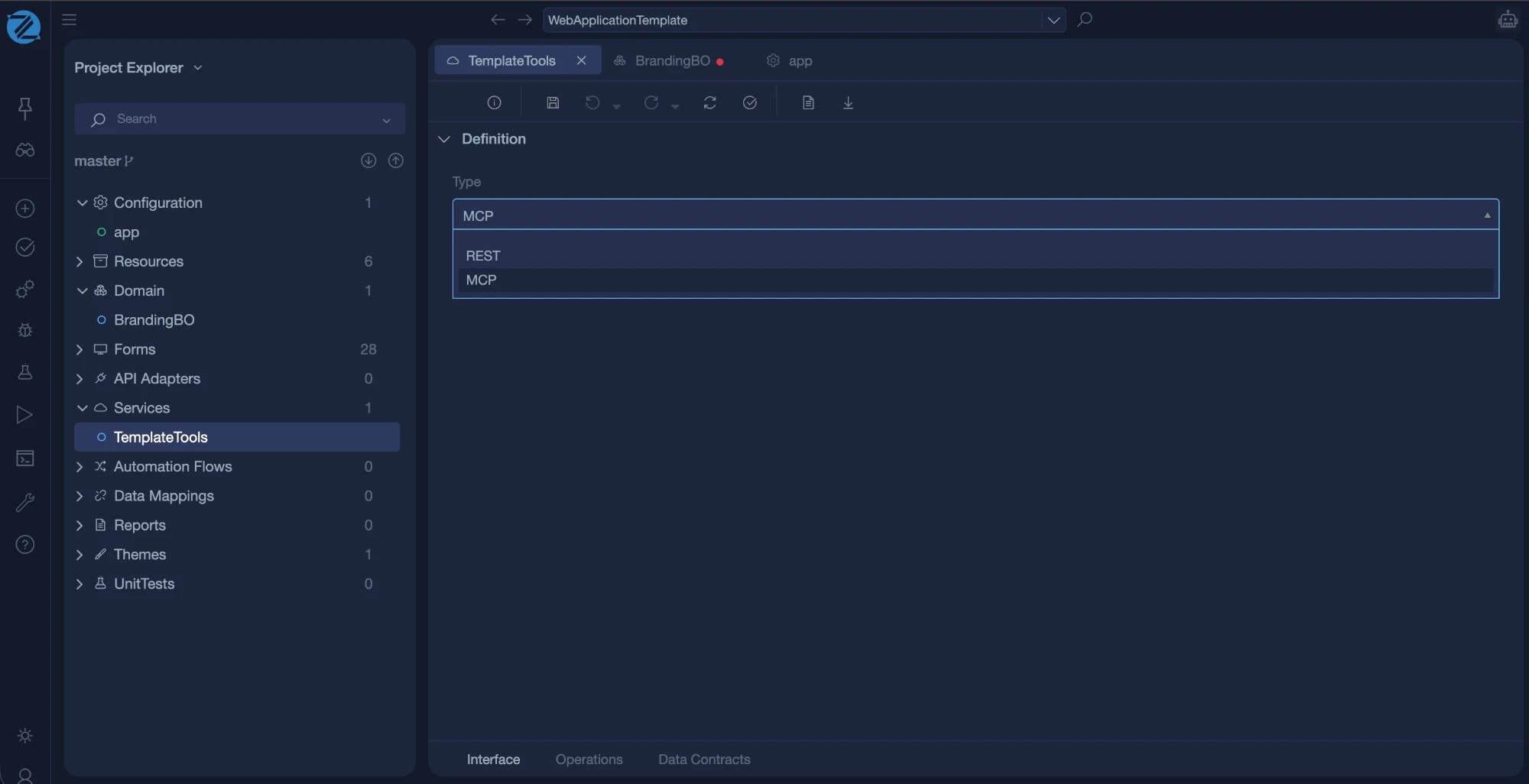
A service can be of type MCP. Each operation of an MCP service becomes a tool that registers automatically in the application's MCP server, so an agent can call your own business logic, not only edit the model.
Note
The protocol type of a service is REST or MCP. Operations of an MCP service use JSON-RPC style interactions instead of HTTP verbs and paths.