Menu
The menu control builds the navigation of an application: a top bar, a side menu, or a tree of pages. A menu is made of items, and each item can open a page, run an action or hold a group of other items.
A menu normally lives in the master page, so that every page shares it.
Menu properties
| Property | Description |
|---|---|
| Menu Type | The visual style, for example a navigation bar. |
| Type | The kind of menu behaviour. |
| Expanded Depth | How many levels are open when the page loads. |
| Expand On Hover | Opens a group when the pointer rests on it. |
| Not Collapsible | The user cannot collapse the menu. |
| Allow User To Change Orientation | Lets the user switch between a vertical and a horizontal menu. |
| Enable Search | Shows a search box in the menu. |
| Enable Search Index, Indexes To Search | Search the application's search indexes from the menu. |
| Enable Favorites | Lets the user mark items as favourites. |
| Enable Most Used Items | Tracks and shows the items the user opens most. |
Menu items
Open the control's Advanced Properties to add and arrange items. Each item has these properties:
| Property | Description |
|---|---|
| Name | The unique name of the item. |
| Display Name | The text shown. It is an expression that returns a string, normally a resource key of the form LocalResources.RES_<menu>_MENU_ITEM_<item>, so that it can be translated. |
| On Click | What happens when the user chooses the item, for example a controller action that opens a form. |
| Icon, Theme Icon | An icon for the item. |
| Tooltip, Item Tooltip | Hover text for the item and for its group. |
| Is Header | The item is a heading for the ones below it, not a link. |
| Right | Aligns the item to the right of a navigation bar. |
Items can be nested to make groups.
Example: a two-item menu
- Open the master page and drag a Menu into the body. Set Menu Type to a navigation bar.
- Open Advanced Properties and add an item named ProductsMI with the display name Products.
- For On Click, choose the form ProductList and its entry point action Index.
- Repeat for Customers.
Things to know
- Display names are compiled into the browser. A display name can use the form's model and resources, but it cannot call
Domainoperations or query the database. To show data, such as the application name, set it in the master page's view model in its controller action and bind the display name toModel.<Name>. - Items follow permissions. An item that opens a page the user is not allowed to see is hidden.
- The Hello World tutorial, part two shows how the wizard adds a Products item for you.
In Studio
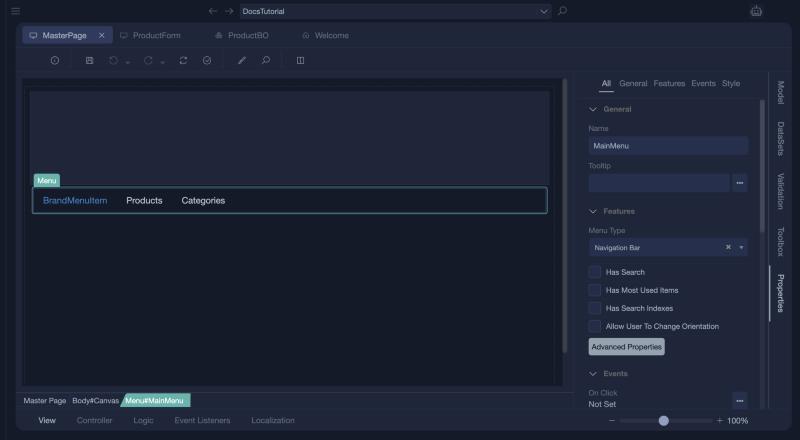
The menu of a master page and its properties: Menu Type (Navigation Bar), Has Search, Has Most Used Items, Has Search Indexes, Allow User To Change Orientation and the Advanced Properties button. The items are edited in the Menu Properties window, which Hello World, part four shows.