Add new item
New on the Taskbar (Ctrl + Insert) opens the Add new item window. You choose a template, give the new model a name, and click Add item.
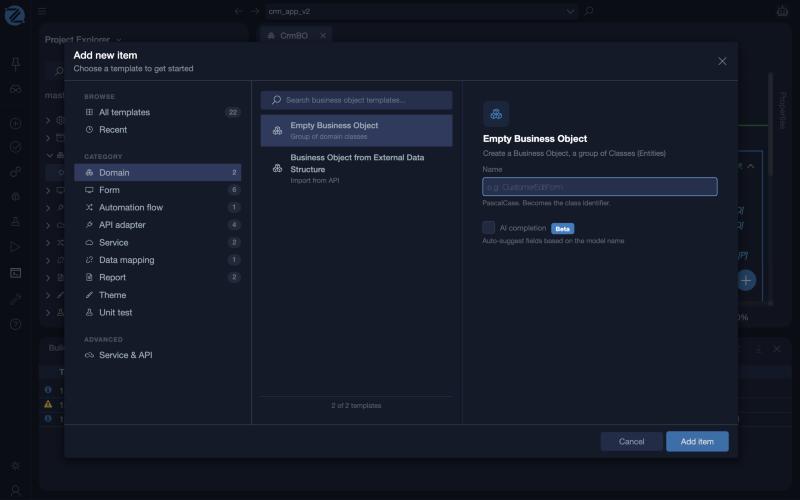
The window has three parts:
- Browse and Category on the left. All templates shows every template, Recent shows the ones you used lately, and the categories narrow the list to one kind of model. The number next to each category is the number of templates in it.
- The templates in the middle, with a search box (Search … templates) that filters them.
- The details on the right: the name of the template, a short description, and the fields it needs. A Name is always required. It must be in PascalCase, for example
CustomerEditForm, and it becomes the class identifier.
Templates
There are 22 templates.
| Category | Template | What it creates |
|---|---|---|
| Domain | Empty Business Object | A group of domain classes |
| Business Object from External Data Structure | A business object imported from an API | |
| Form | Empty Form | A blank canvas |
| Data Entry and List Form | A combined view and edit form | |
| Data Entry Form | A form to create and edit records | |
| List Form | A table to browse records | |
| Master Page | A shared layout shell | |
| Partial View | A reusable form fragment | |
| Automation flow | Empty Automation Flow | Process automation |
| API adapter | Empty API Adapter | A connection to an external API |
| Rest API Adapter | REST integration | |
| REST API Adapter from Swagger | REST integration from a Swagger specification | |
| SOAP API Adapter | SOAP integration | |
| Service | Empty Service | A service exposed as a REST API |
| CRUD Service | A service with full create, read, update and delete operations | |
| Data mapping | Empty Data Transformation | A mapping between data structures |
| Report | Report | A data visualisation |
| Report Base on Form | A form-based output | |
| Theme | Empty Theme | Visual styling |
| Unit test | Empty UnitTest | A place to write test cases |
| Advanced: Service & API | Passthrough Proxy | A transparent API proxy. It asks for a Swagger Url, and can Create Domain Model |
| API Sandbox | A place to test and explore APIs |
AI completion
The Empty Business Object template has an AI completion option (beta). When you tick it, zAppDev suggests fields for the new business object based on its name. See zAI.
Note
A template creates the model with its starting content. You then edit it in its own editor. See Editors.