Event Listeners
An event listener runs a piece of Mamba when something happens in the application as a whole, not on a particular page: someone signs in, a session starts, an error occurs, an object is saved. Use listeners for cross-cutting work, such as recording who signed in, or preparing data at start-up.
The Event Listeners tab is available at the bottom of the form editor.
Adding a listener
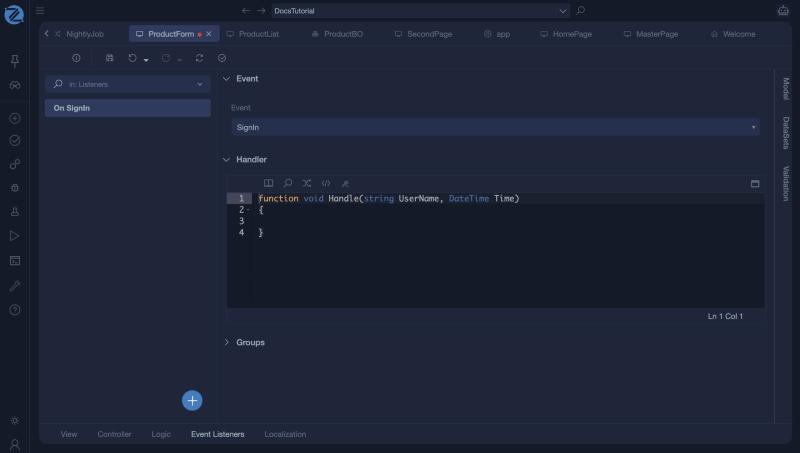
Open the Event Listeners tab, click +, and choose New Event. A listener is created for the SignIn event. Change the event in the Event list, and write the code in Handler.
Events
| Event | When it fires |
|---|---|
| SignIn | A user signs in. |
| SignOut | A user signs out. |
| UserAuthenticating | A user is being authenticated. |
| ExternalUserCreating | A user from an external login provider is being created. |
| ApplicationStart | The application starts. |
| ApplicationEnd | The application stops. |
| ApplicationError | An unhandled error occurs. |
| SessionStart | A new session starts. |
| OnInstanceSave | An object is saved. |
| FileDownload | A file is downloaded. |
The handler
The handler is an operation written in Mamba. It starts as an empty function void Handler().
Tips
- Keep handlers short. They run in the middle of other work, such as a sign-in, so a slow or failing handler affects the user.
- Log from a handler, so you can see in the application logs that it ran. See DebugLib.
- For work that must run at a given time, use an automation flow instead.