DataSets
A dataset tells a form where a control gets its data: a list of products, the options of a dropdown, the points of a chart. A control such as a Data List, a Dropdown or a Chart is bound to a dataset, and the dataset does the fetching, filtering, sorting and paging.
Open the DataSets panel on the right of the form editor to see the datasets of the form and to add new ones.
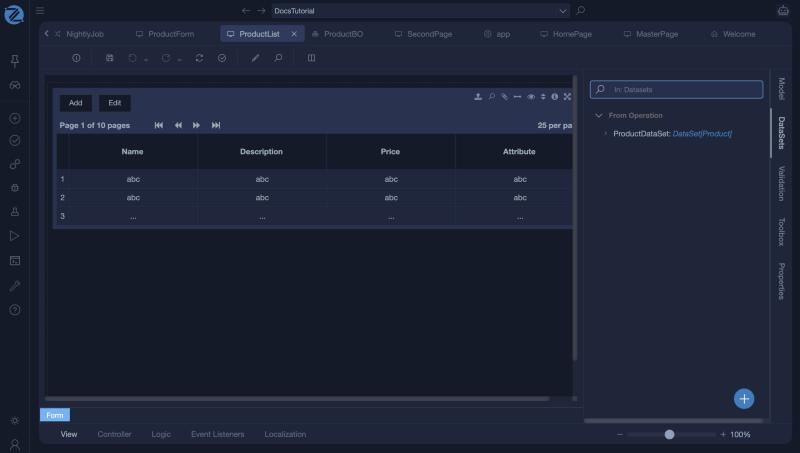
In the list form of the example, the panel shows one dataset, ProductDataSet, that comes from an operation and holds a collection of Product:
Adding a dataset
Click + and choose where the data comes from:
| Source | Use it for |
|---|---|
| Manually | A fixed list of options that you type in. |
| From Enumerator | The values of an enumeration, for example the statuses of an order. |
| From Viewmodel | A collection that is already in the form's view model. |
| From Operation | The result of an operation, such as the Get all operation of a class, or an operation you wrote. |
A dataset can also come from an API adapter or a work item. These are the types the form editor knows: Manual, BusinessObject, Enumerator, Interface, ViewModel and WorkItem.
When you drop a Data List on a form and choose Create next to Dataset, Studio creates a dataset from a class and its Get all operation for you.
The dataset window
A dataset from an operation has five tabs.
Source
| Field | Description |
|---|---|
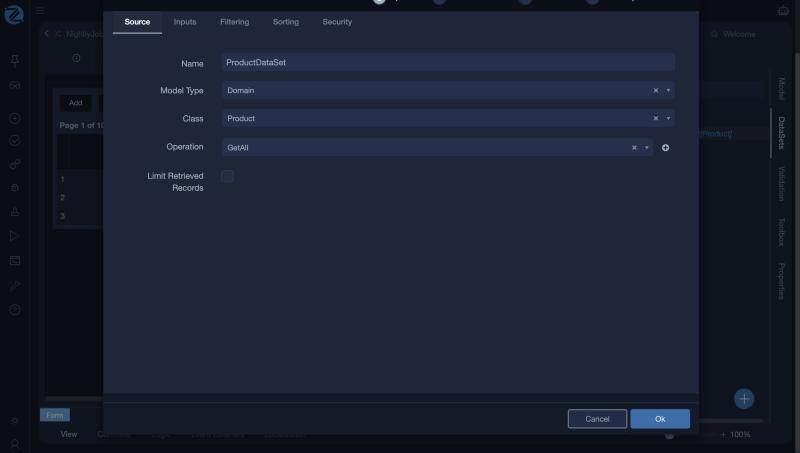
| Name | The name of the dataset. Controls refer to it by this name. |
| Model Type | The kind of model the data comes from, such as Domain for a business object. |
| Class | The class whose records are fetched. |
| Operation | The operation that fetches them, for example GetAll. The + next to it creates a new operation. |
| Limit Retrieved Records | Fetch only a limited number of records. |
Inputs
Inputs are the parameters of the operation. For an operation that needs a value, such as a customer, define the input here, and supply it from the control or the form when the data is fetched. Each input has a Name and a Data Type.
Filtering
A filter is a small piece of Mamba that decides which records are kept. By default it returns true for every item.
DataItem is the item being tested. The filter runs on each item that was fetched, so for large tables prefer to limit the records in the operation, which runs in the database. See Working with data.
Sorting
Add the members to sort by under Ordering, and choose the order.
Security
Tick Overwrite Default Security to replace the default security of the dataset with your own.
Using a dataset
- Create the dataset and give it a clear name, such as
ProductsDS. - Select the control, such as a dropdown or a list, and set its Dataset property to that name.
- For a dropdown or radio buttons, also set the display and value members.
Tips
- One dataset can feed several controls.
- Name datasets after what they hold, with a suffix such as DS, so they are easy to find.
- If a list stays empty, check the dataset's filter and the permissions of its operation.