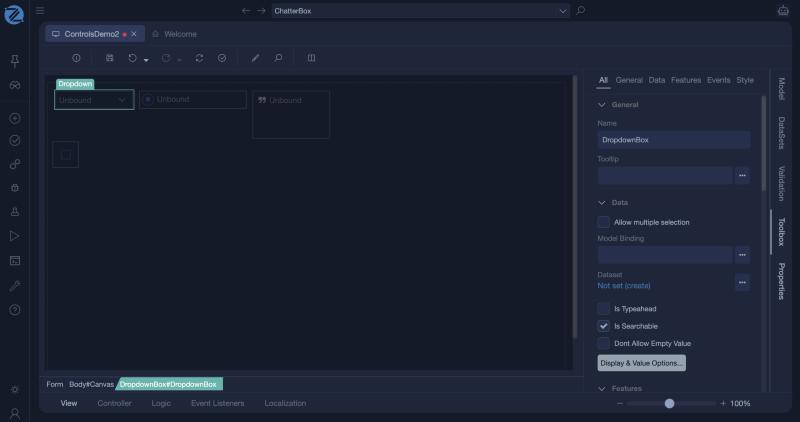
Dropdown
A dropdown lets the user select one value from a list. The list comes from a dataset of the form, and the selection is stored in the view model.
Setting it up
- Add a dataset that supplies the options. For example:
- Name:
ProductsDS - Type: BusinessObject
- Class:
Product - Operation:
GetAll
- Name:
- Add a view model property to hold the selection, for example
SelectedProduct, of type BoClass with data typeProduct. - Add the Dropdown to the layout and set:
- Model binding:
SelectedProduct - DataSet name:
ProductsDS - Display member:
Name(what the user sees) - Value member:
$Value(what is stored)
- Model binding:
The dataset types you can use are Manual, BusinessObject, Enumerator, Interface, ViewModel and WorkItem. See the Form editor.
Properties
| Property | Description |
|---|---|
| Model Binding | The view model value that holds the selection. |
| Dataset | The dataset that supplies the options. |
| Display Member | The member of each item that the user sees. |
| Value Member | The member stored in the binding. |
| Allow multiple selection | The user can choose more than one value. |
| Is Typeahead, Is Searchable | The user can type to find an option. Is Searchable is on by default. |
| Dont Allow Empty Value | The user must choose a value. |
| SearchPattern, Show Options On Focus | How the search matches, and whether the list opens when the control gets focus. |
| Display & Value Options... | Opens the window where you choose the Display Member and the Value Member. |
| Read Only, Required, Does Not Make Form Dirty | As for the other input controls. |
Events
| Event | When it fires |
|---|---|
| On Change | The user chooses another value. Use it to refresh dependent fields. |
Example: choose from an enumeration
- Create a dataset of type Enumerator for the enumeration, for example
Domain.OrderStatus. - Add a dropdown with the display and value members of that dataset.
- A dropdown bound to an enumeration shows the names of its values. If it shows raw keys instead, the enumeration literals need localized resources.
Tips
- A dropdown shows a prompt while nothing is chosen. Give the prompt a resource so it can be translated.
- For a long list of records, use a Pick List. For two to five options that should all be visible, use Radio Buttons.
- A dropdown bound to an association, such as a product's category, lets the user set that association.
In Studio
The dropdown and its properties, with Allow multiple selection, Dataset, the search options and the Display & Value Options... button.