Radio Button
A radio button group lets the user choose exactly one option from a short list. The options come from a dataset of the form, so they can be a list of records, an enumeration or fixed values.
When to use it
Use radio buttons when there are few options (about two to five) and you want them all visible. For longer lists, use a Dropdown.
Properties
| Property | Description |
|---|---|
| Model Binding | The view model value that holds the selected option. |
| Dataset | The dataset that supplies the options. |
| Display Member | The member of the dataset item shown to the user. |
| Value Member | The member stored in the binding when an option is chosen. |
| Orientation | Vertical or Horizontal. |
| Display & Value Options... | Opens the window for the Display Member and the Value Member. |
| Read Only | The user cannot change the choice. |
| Required | The form is not valid until an option is chosen. |
Example
Choose a delivery method from an enumeration.
- Create a dataset of type Enumerator for
Domain.DeliveryMethod. - Add a view model property
Methodof that enumeration type. - Add a Radio Button with binding
Method, the dataset, and the display and value members. - Read the choice in a controller action:
function void Save()
{
    if Model.Method == Domain.DeliveryMethod.Courier
    {
        Model.Order.ShippingFee = 5;
    }
}
Tips
- Setting up the dataset works as it does for a Dropdown.
- Set Required so that the form cannot be saved with nothing chosen.
In Studio
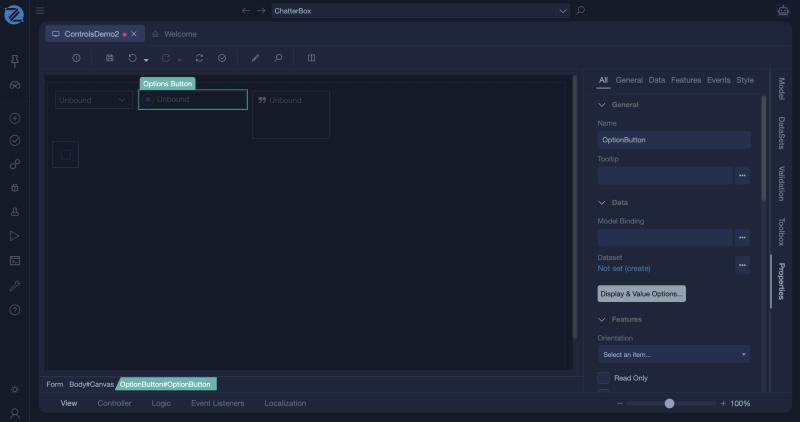
The radio button (an Options Button) and its properties.