Localization of a form
Every text a user sees, such as a label, a tooltip, a placeholder or a message, should be a resource with a value for each language of the application. A form has its own list of resources in its Localization tab, so it can be translated without changing the form.
For resources of business objects, see Localization. The languages of an application are chosen in its configuration.
The Localization tab
The tab shows a searchable list of the resources of the form on the left. Select one to see its Name and a table of Value per Language on the right. Type the text for each language.
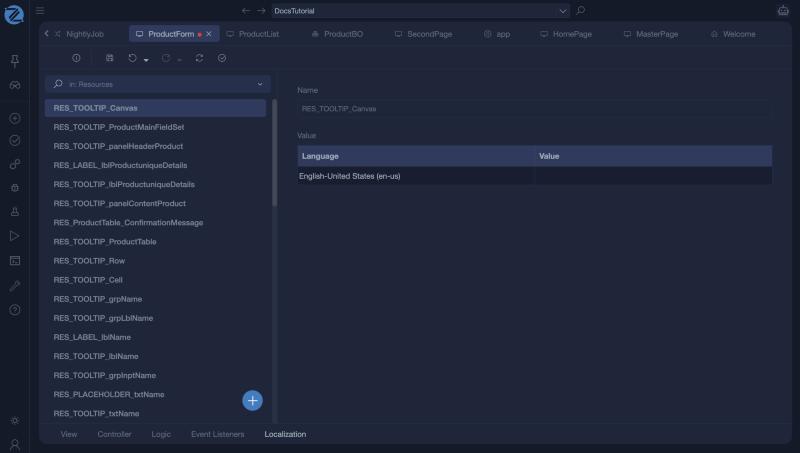
Resource names
Studio creates resources for you as you build the form, and names them after what they belong to:
| Pattern | Holds |
|---|---|
RES_LABEL_<control> |
The caption of a label. |
RES_TOOLTIP_<control> |
The tooltip of a control. |
RES_PLACEHOLDER_<control> |
The placeholder of an input. |
RES_<table>_ConfirmationMessage |
The confirmation question of a table or button. |
RES_PAGETITLE_<action> |
The title of the page, for an action. |
Using a resource
In Mamba, use LocalResources followed by the resource name:
ShowMessage(LocalResources.RES_ProductSaved, AppLib.MessageType.Success);
Model.Title = LocalResources.RES_PAGETITLE_Edit;
In a control, type the resource key as the caption, instead of plain text, so that the text follows the language of the user.
Adding a resource
Click + and give the resource a unique name. Then fill in the value for each language of the application.
Tips
- Use resources for everything the user reads. Text typed directly into a caption cannot be translated.
- Name your own resources clearly, for example
RES_ProductSaved. - A dropdown bound to an enumeration, or a message that shows its raw key, usually means a resource is missing. Add it here, or in the business object for enumeration values.