Repeater
A repeater is a container that displays a repeating collection of data. Unlike a Bound Table, it does not impose a table: you can lay the items out as a list, as cards or as any custom grid.
How it works
The repeater is bound to a collection in the view model. Whatever you place inside it is repeated once for each item of the collection, and the controls inside bind to the properties of the current item.
Example
A list of tasks, each shown as a row with a check box, a title and a due date.
View model
TaskList(collection)Title(attribute)DueDate(attribute)IsCompleted(attribute)
Layout
- Repeater: model binding
TaskList- Container: display type Flex, flex direction Row
- Check Box: binding
IsCompleted - Label: binding
Title - Label: binding
DueDate
- Check Box: binding
- Container: display type Flex, flex direction Row
Tip
Use a Bound Table when you want a table with a header row, and optional rows to add and delete. Use a repeater when you want a free layout.
Properties
| Property | Description |
|---|---|
| Model Binding | The collection in the view model that the repeater repeats over. |
| Filtering and Sorting, Filtering Action | An expression and an action that filter and sort the items. |
Everything inside the repeater is repeated once for every item, and controls inside it bind to the properties of the current item.
Events and actions on an item
Controls inside the repeater, such as a button on a card, belong to one item. Pass what the action needs, such as the item's Id, as a parameter of the action.
Layout tips
- A repeater renders all its items inside one wrapper element. To arrange the items as a grid of cards, give the repeater a CSS class and style the wrapper's children in the theme.
- If the collection is empty the repeater shows nothing. Show a Nothing here yet label next to it, with a rule that shows it only when the collection is empty.
In Studio
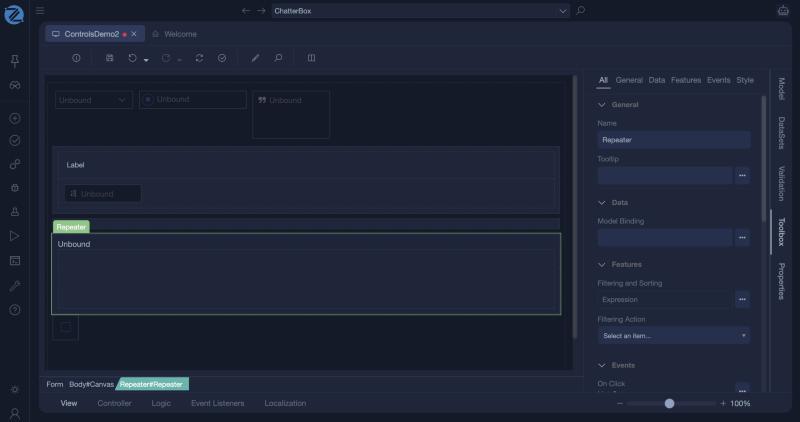
A repeater and its properties. Besides Model Binding it has Filtering and Sorting and a Filtering Action.